How to revoke a cancelled GST registration
If a tax officer cancelled your GST registration, you can apply on the GST portal to get it back. Who can apply, the time limits, what to file first, and the steps.
By the end of this guide, you will have applied on the GST portal to get back a registration that a tax officer cancelled.
Getting it back is called revocation of cancellation. You apply in FORM GST REG-21. If the officer agrees, your GSTIN (your GST registration number) is active again from the date of cancellation.
Before you start
Check that you can apply
You can apply if a tax officer cancelled your registration without you asking, for example for not filing returns. The portal calls this a suo moto cancellation (“on its own”, in Latin).
You can’t apply if you asked for the cancellation yourself, or a legal heir asked for it after the owner died. To register again, apply for a new registration in FORM GST REG-01. A legal heir who carries on the business must also apply for a new registration (the portal’s FAQs on cancellation by a legal heir, question 2).
Not cancelled yet? If the portal sent you a notice for not filing returns and your registration shows as “Suspended”, file all your due returns. The portal then drops the case by itself (suo moto cancellation FAQs 23 and 24). If it doesn’t, open Services > User Services > View Notices and Orders and click INITIATE DROP PROCEEDING.
Check the time limit
Your cancellation order shows two dates (suo moto cancellation FAQ 6):
- the order’s date: the day the order was issued
- the date of cancellation: the day the cancellation starts. It can be earlier than the order’s date.
The portal counts from the order’s date, even if you got the order later (the revocation manual). So apply early. For example, an order dated 10 Mar 2026 cancels your registration from 1 Jan 2026. Count from 10 Mar 2026.
| Days since the order’s date | Can you apply? |
|---|---|
| Up to 90 | Yes |
| 91 to 270 | Yes, with a reason for the delay |
| Over 270 | No. The portal won’t take the application. |
These limits come from rule 23(1) of the CGST Rules (the Central Goods and Services Tax Rules, 2017), as changed by Notification No. 38/2023-Central Tax.
Have these ready
- Your username and password for the GST portal. Type them only on gst.gov.in. Your old login still works after a cancellation (revocation FAQ 2).
- The cancellation order, under Services > User Services > View Notices and Orders. Note the order’s date, the date of cancellation and the reason.
- Your missing returns, filed and paid. If you were cancelled for not filing returns, first file every return due by the date of cancellation. For most shops, that means GSTR-1 and GSTR-3B for each month or quarter (section 39(10) of the CGST Act, the Central Goods and Services Tax Act, 2017). In the composition scheme, it means CMP-08 for each quarter and GSTR-4 for each year (rule 62 of the CGST Rules). Pay the tax, interest, late fee and any penalty on them too. Until then, you can’t apply (rule 23(1) of the CGST Rules; Circular No. 99/18/2019-GST explains which returns). Our late fee and interest calculator shows the fee on a late GSTR-3B or GSTR-1, with its maximum. See also how to file a nil GSTR-3B and how to file GSTR-1.
- Aadhaar authentication, if it was never done. Rule 10B of the CGST Rules requires it for this application. If you run the business alone, it is needed for you. If not, it is needed for the authorised signatory, the person allowed to sign for the business. It is also needed for the proprietor, or a partner, the Karta (the head of a Hindu undivided family), or the managing or a whole-time director. Do it under Dashboard > My Profile > Aadhaar Authentication Status. No Aadhaar number yet? Do e-KYC (an online check of your identity papers) instead. You need the Aadhaar Enrolment ID and one of these: a bank passbook with photo, a voter ID card, a passport or a driving licence.
- Your reason for revocation, and any papers that support it: PDF or JPEG files of up to 1 MB each (the form in the manual).
- If more than 90 days have passed: your reason for the delay, and any proof (files of up to 5 MB, says the same form).
- The authorised signatory’s mobile phone and email for the one-time password (OTP), or your digital signature certificate (DSC) if you sign with one. If the business is a company (such as a private limited company) or an LLP (limited liability partnership), have a DSC ready. The portal may ask for one. Its list of new features for Oct to Dec 2021 says companies can now sign with EVC too. But some of its help pages still say a DSC is mandatory for companies and LLPs (such as a picture in its manual on cancellation).
There is no fee for this application (the instructions in FORM GST REG-21).
Steps
The labels in bold are as the portal’s manuals show them on 31 Oct 2026. The real screens may differ a little.
-
Go to gst.gov.in and log in with your old username and password.
-
Open Services > Registration > Application for Revocation of Cancelled Registration (marked A in the picture).
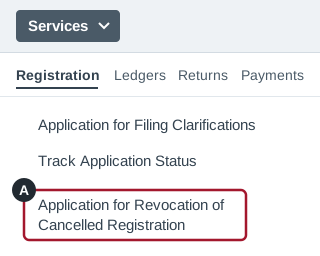
Illustration, not a screenshot: a simplified drawing of the Services menu. The real screen has more on it and may look different. -
If Aadhaar authentication isn’t done, a warning appears. Click I HAVE AADHAAR or I DON’T HAVE AADHAAR, PROCEED WITH E-KYC, and finish it in your profile. Then start again at step 2.
-
If more than 90 days have passed since the order’s date, a warning appears. Click OK.
-
Only if you are past 90 days: type why you are late in Reason for Condonation of delay. Attach any proof with the Choose File button under it (both marked A in the picture below). Condonation means accepting a delay. For example: “I was in hospital for two months. My hospital papers are attached.”
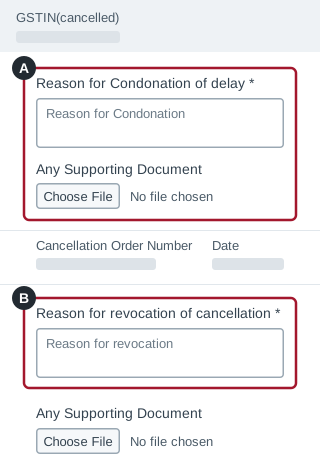
Illustration, not a screenshot: a simplified drawing of the top of the form. The real screen has more on it and may look different. -
In Reason for revocation of cancellation (marked B), say why your registration should be restored. For example:
- “I have now filed all my returns and paid the tax, interest and late fees.”
- “My shop is still running, and I will file on time.”
-
To add papers that support your reason, click Choose File under Any Supporting Document, below that box.
-
Tick the Verification box, choose the Name of Authorized Signatory, and type the Place (marked A in the picture below).
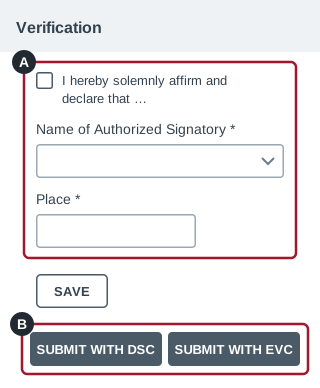
Illustration, not a screenshot: a simplified drawing of the bottom of the form. The real screen has more on it and may look different. -
Click SUBMIT WITH DSC or SUBMIT WITH EVC (marked B). To finish later, click SAVE instead.
-
With DSC: click PROCEED, then YES, and sign with your DSC. With EVC (electronic verification code): type the OTP sent to the authorised signatory’s registered email and mobile, and click VALIDATE OTP.
-
A success message appears. The manual says an email and SMS with your ARN (application reference number) come within 15 minutes. Keep the ARN.
Check it worked
-
You have the email and SMS with your ARN.
-
In Services > User Services > View My Submissions, your application is listed with Form No. GST REG-21 (marked A).
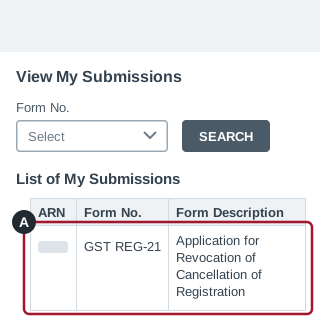
Illustration, not a screenshot: a simplified drawing of the View My Submissions page. The real screen has more on it and may look different. -
To follow your application, open Services > Registration > Track Application Status. Choose Registration in Module, type your ARN and click SEARCH.
-
No email or SMS? Look in Services > User Services > My Saved Applications. If your application is there, it was saved but not submitted: open it and submit it. The manual says a saved application is kept for 15 days.
What happens next
If you applied after 90 days, a senior officer first decides whether to accept the delay. If it is accepted, the officer who handles your registration takes over.
That officer restores your registration or first sends you a notice:
| Form | What it is | Time limit |
|---|---|---|
| GST REG-22 | Order restoring your registration | Officer: within 30 days of getting your application |
| GST REG-23 | Notice saying why your application may be rejected, with a hearing date | You: reply within 7 working days of getting it |
| GST REG-24 | Your reply to that notice | Officer: decides within 30 days of getting it |
| GST REG-05 | Order rejecting your application | You: can appeal (see “If you are too late”) |
These time limits are in rule 23 of the CGST Rules. Your application can’t be rejected without a hearing (section 30(2) of the CGST Act).
- If it is approved, you get an email and SMS. Your GSTIN changes from “Inactive” to “Active”, from the date of cancellation (see My Profile).
- If it is rejected, you get an email and SMS, and the order is on your dashboard. Your GSTIN stays “Inactive”. You can appeal (see below).
The portal’s manuals and FAQs don’t show where to file your reply to a REG-23 notice. If you can’t find where to reply, contact the officer who sent it, well before the 7 working days run out. Also attend the hearing on the date in the notice. If you don’t reply or don’t attend, the officer will decide using the papers they already have (FORM GST REG-23).
Rule 23 doesn’t say your registration comes back by itself if the officer is late. If no order comes in time, contact the officer who handles your registration, or ask a qualified tax professional. Don’t wait long: the time to appeal is limited (see “If you are too late”).
After your registration is back
Within 30 days of the order that restores it, file every return for the time it was cancelled. That time runs from the cancellation order’s date to the date of the restoring order. If your date of cancellation is earlier, start from the date of cancellation (rule 23(1) of the CGST Rules, from Notification No. 20/2019-Central Tax). Our GST due dates page lists each return’s due date after that.
If you miss these 30 days, your registration can be cancelled again (rule 21(b) of the CGST Rules, as replaced from 1 Nov 2026 by Notification No. 05/2026-Central Tax).
In those returns, you can also claim input tax credit (ITC), the GST you paid on business purchases. This works even for a bill whose usual time limit ran out while your registration was cancelled. The limit must not have run out by the cancellation order’s date (section 16(6) of the CGST Act).
If you are too late
After 270 days, the manual points you to an appeal to the Appellate Authority, the officer who hears GST appeals.
You can appeal against the cancellation order or against an order rejecting your application. File the appeal within 3 months of the day the order was communicated to you (section 107 of the CGST Act). If the Appellate Authority accepts your reason for the delay, you get 1 more month. The portal’s appeal FAQs say the same.
The 270 days run from the order’s date, but the 3 months from the day the order was communicated. By day 270, it is usually too late to appeal against the cancellation itself.
To appeal, open Services > User Services > My Applications. Choose Appeal to Appellate Authority as the Application Type, click NEW APPLICATION, and choose Registration Order as the Order Type. The appeal is made in FORM GST APL-01.
If both the 270 days and the time to appeal have passed, ask a qualified tax professional. The manual names no other way to get your registration back. The last special chance to apply late ended on 31 Aug 2023 (Notification No. 03/2023-Central Tax, extended by No. 23/2023-Central Tax).
To register again, apply for a new registration in FORM GST REG-01. It doesn’t bring back your old registration. Before you apply, file every return still due on the cancelled registration, and clear everything you owe on it (Circular No. 257/03/2026-GST, para 4). If you had to file GSTR-3B, those returns include the final return, GSTR-10 (section 45 of the CGST Act and rule 81 of the CGST Rules).
A change from 1 Apr 2027
Some registrations are suspended by the portal for missing returns or bank account details. From 1 Apr 2027, if this isn’t fixed within 30 days, the portal cancels the registration itself (new rule 22(5)). To get it back, apply in FORM GST REG-21 within 180 days of the date of cancellation, not of the suspension (new rule 23A). First file the pending returns and pay what is due, or add the bank details. The portal then restores it by itself (Notification No. 05/2026-Central Tax, which starts both rules on 1 Apr 2027). A registration cancelled by an officer still follows this guide.
Sources
- Manual: Revocation of Cancelled Registration GST portal help pages (tutorial.gst.gov.in)
- FAQs: Revocation of Cancelled Registration GST portal help pages (tutorial.gst.gov.in)
- FAQs: Suo Moto Cancellation GST portal help pages (tutorial.gst.gov.in)
- FAQs: Filing for Cancellation of Registration by Legal Heir in case of Death of Sole Proprietor GST portal help pages (tutorial.gst.gov.in)
- Manual: Cancellation of Registration GST portal help pages (tutorial.gst.gov.in)
- New Functionalities made available for Taxpayers on GST Portal (October-November-December, 2021) GST portal help pages (tutorial.gst.gov.in)
- FAQs: My Saved Application GST portal help pages (tutorial.gst.gov.in)
- Manual: Track Application Status (Post-Login) GST portal help pages (tutorial.gst.gov.in)
- Manual: Filing an Appeal against Registration Cancellation Order (FORM GST APL-01) GST portal help pages (tutorial.gst.gov.in)
- FAQs: Filing an Appeal against Registration Order (FORM GST APL-01) GST portal help pages (tutorial.gst.gov.in)
- Central Goods and Services Tax Act, 2017: sections 16(6), 29, 30, 39(10), 45 and 107 CBIC’s tax information site: open GST, then Acts
- Central Goods and Services Tax Rules, 2017: rules 8, 10B, 21, 23, 62 and 81 CBIC’s tax information site: open GST, then Rules
- FORM GST REG-21 (its instructions: no fee) and FORM GST REG-23 (reply within seven working days) CBIC’s tax information site: open GST, then Forms
- Notification No. 03/2023-Central Tax CBIC (taxinformation.cbic.gov.in)
- Notification No. 23/2023-Central Tax CBIC (taxinformation.cbic.gov.in)
- Notification No. 38/2023-Central Tax, 4 Aug 2023 (rule 23(1) from 1 Oct 2023, 90 days plus up to 180 more) CBIC (taxinformation.cbic.gov.in)
- Notification No. 05/2026-Central Tax, 26 Oct 2026: Central Goods and Services Tax (Amendment) Rules, 2026 (new rule 21 from 1 Nov 2026; new rules 22 and 23A from 1 Apr 2027) CBIC (taxinformation.cbic.gov.in)
- Notification No. 20/2019-Central Tax, 23 Apr 2019 (returns within 30 days of revocation) CBIC (taxinformation.cbic.gov.in)
- Notification No. 35/2021-Central Tax, 24 Sep 2021 (rule 10B, Aadhaar authentication) CBIC (taxinformation.cbic.gov.in)
- Circular No. 99/18/2019-GST, 23 Apr 2019 (paras 3 and 4, the returns to file before applying) CBIC (taxinformation.cbic.gov.in)
- Circular No. 257/03/2026-GST, 26 Oct 2026: Guidelines for the handling applications for GST registration (para 4: when an earlier registration was cancelled under rule 22) CBIC (taxinformation.cbic.gov.in)
- Mandatory Aadhaar authentication for registered person, 22 Dec 2021 GST portal news and updates (www.gst.gov.in)
- FAQs on recommendations made in the 57th GST Council meeting, 12 Oct 2026: FAQ on cancellation of GST registration (questions 7 and 8) GST Council (gstcouncil.gov.in)